BeLife is an innovative platform that has the mission of empowering musicians and music promoters.
Role
Solo UX UI Designer:
User Research
Journey Mapping
Wireframing
Information Architecture
Interaction Design
Design Systems
Prototyping
Brand Design & Creative Direction
Timeline
6 months
Overview

I was hired by Belive team to design the MVP and branding identity of a new innovative platform from the UK, that aims to empower musicians and music promoters.
The initial vision was to facilitate and help artists book live music events, connect with music promoters, and ultimately grow as artists in their communities.

The Problem
Currently, bands djs and music artists still rely on outdated methods to find opportunities to propel their careers forward. In an industry where making the right connections is key, it becomes extremely difficult for artists to find venues where they can show their talent.
Users

Musicians
Age: 23-45
Location: UK
Occupation: Full time or part time job in any sector, while music serves mostly as a hobby
-
They are DJS, rappers, solo singers, or play in a band, passionate ambitious individuals with a deep love for music.
-
They have a common objective: to book live music events to show their talent, and grow as artists.
-
The techniques used to find music Gigs and to connect with promoters are inefficient and time consuming. These techniques consist on researching for Gigs online, and cold e-mailing promoters.
Most of these individuals have full-time or part time jobs, therefore don’t have a lot of time to work on promoting themselves.

Promoters
Age: 35-60
Location: UK
Occupation: Have their own company or work for a small to medium size Promoter
-
Business-driven individuals actively involved in curating and promoting live music events, with a special focus on discovering and showcasing emerging talent.
-
They are driven by a desire to provide unique experiences to their audiences, and be financially successful
-
Extremely busy individuals, they rely on agents to find music talent for their venues. Agents are efficient but the problem is that they charge very high fees.
They receive a lot of e-mails from artists directly but don’t have the time to filter them by genre, type of artist and availability, making it hard to hire artists directly.
My Process

Discovery and Analysis
Client Workshops and quizz
User Interviews
Competitors research
Persona development
User journey mapping
Features List

Concepting
Wireframes
Brand identity moodboards
Defining the creative direction
Client feedback cycles

Outcome
Design system
Branding
Final high fidelity designs
Prototyping
User testing
Discovery and Analysis

User Flow - Promoters platform
Next step was to conduct user interviews with diverse profiles within the music industry to gain insights into their challenges and aspirations.
After gathering insights, I began synthesising recurring patterns and themes. This led to the creation of persona profiles, which delineated the unique goals and pain points of each user type. This allowed me to define the user flows and feature list of the platform.

User Flow - Musicians
To kick off the discovery phase, Belive team and I organized workshop sessions followed by a brand quizz. During these sessions, we established project objectives, mapped out the project roadmap, and brainstormed conceptual ideas. We initiated the process of defining the brand's strategy and creative direction.
Concepting

Designing the wireframes consists on defining the information architecture of screens. I explored various navigation approaches to determine the best experience for the user.
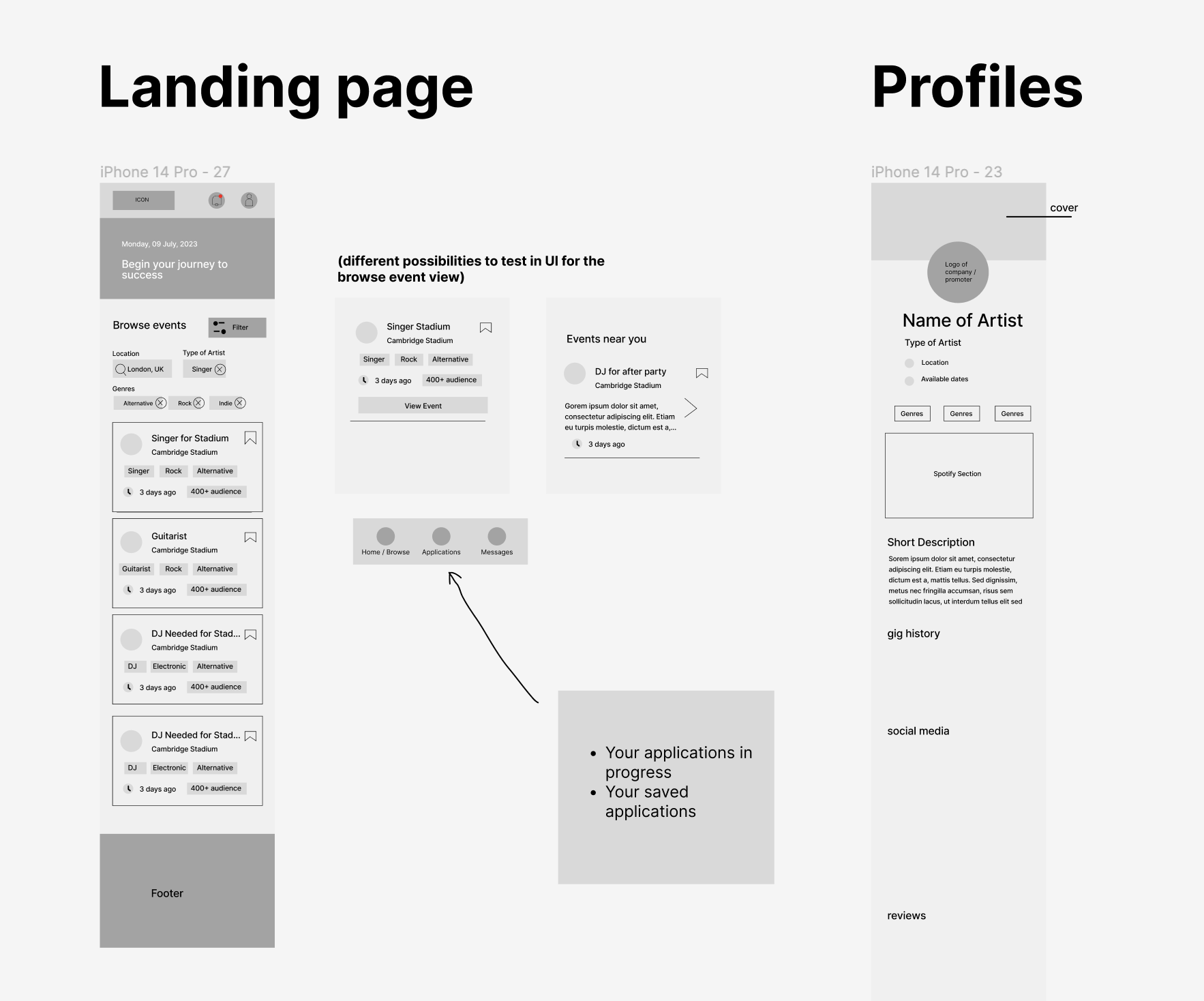


I collaborated with Belive team along the way to validate concepts and gather feedback to continue improving the experience.
The Solution

Homepage
The MVP solution is an app designed to streamline the process of booking live music events for artists, facilitating connections with music promoters, and fostering their growth within their communities.
Upon signing up, users can choose between two roles: musician or promoter. This selection directs them to distinct landing pages tailored to their needs, offering corresponding functionalities within the platform.

Promoters Landing page

Browse Artists
Our solution offers an easy way for promoters to browse artists: users can filter them by location, distance radius, type, availability dates, and genres. They can also access curated profiles and message artists directly. However, artists cannot initiate conversations with promoters due to the aforementioned issue.

Profiles
The key feature for promoters on the platform is the 'My Events' section. Here, they can post music venues for musicians to apply to. They can quickly see how many candidates have applied and easily access the candidates' dashboard.

Filters

Candidates dashboard

Sign up form

Design System

Design System

User Testing
I conducted 5 user tests to validate these design solutions. The goal was to understand if there are any pain points or room for improvement in the designs. I asked users to speak their thoughts out loud while they navigate freely or with a specific task inside the prototype.
My goal was to understand:
Do users get confused at any part of the flow?
Is it easy for them to read and understand the events page and listings?
Is there any icon or button that is unclear?
Is it easy for promoters to browse artists and create events?
Is the design visually appealing and easy to use?
What additional features or improvements would they like to see on the platform?
“If you can create a safe space and community where we know we can find trustful promoters, I would use the app every day.
”
“ I love the clean and simple aesthetic. My favourite feature is the option to customise my music profile. Can I add live music videos as well?”
“One of my struggles is to find talent that can be matched together by style and type of music. These filters would definitely make my life easier
”
“The possibility of having a contract type system would save us a lot of time”
Key Insights
Overall in terms of user experience, we had very positive feedback on the tests, and all the tasks were performed by the users with ease.
There were some iterations we did in terms of features and design:
We've realized the critical importance of having reliable promoters on our platform. Musicians seek transparency and credibility before committing to events. In response, I've developed a comprehensive promoter profile feature, incorporating social media links for enhanced visibility and trustworthiness.

We've introduced a new feature allowing musicians to follow promoters. This enables them to receive immediate notifications whenever a promoter publishes a new venue, ensuring they stay updated in real-time.
We recognise that the success of this platform hinges significantly on the caliber of its user base. Building trust among users is paramount to the app's credibility. Addressing this challenge remains a priority for us, and one potential avenue for improvement is implementing a review system.
Brand Identity
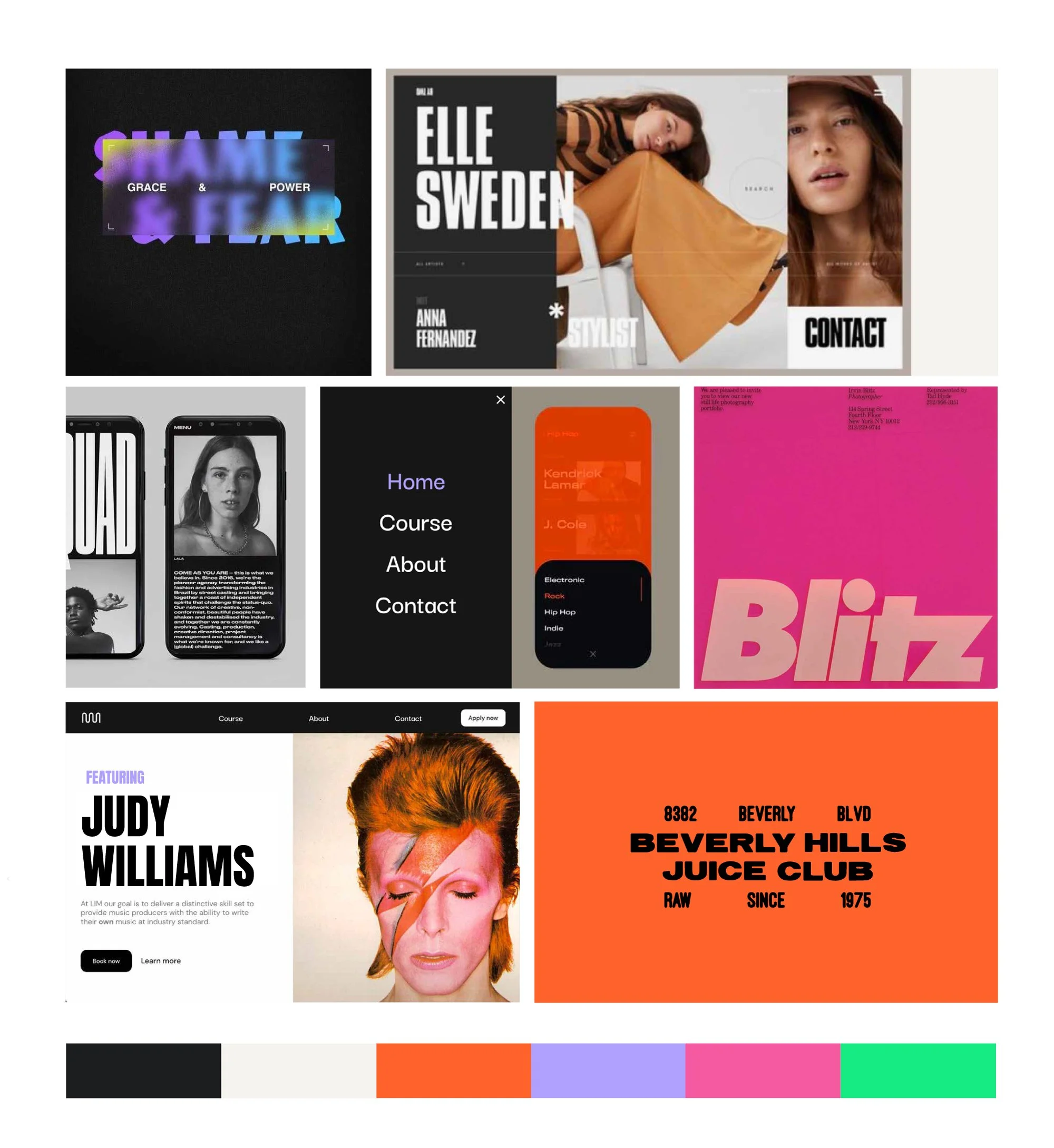
Drawing inspiration from vintage vinyl graphic design, our retro-themed aesthetic exudes a fashionable, energetic vibe with bold, dark elements. Incorporating nostalgic nods to musical icons and vibrant night sky hues, we employ gradients and transparencies for a modern touch.
The typography combines bold caps with simple sans serif fonts for legibility on the app.
The color palette mirrors the ambiance of nocturnal music events, featuring dark tones reminiscent of the night sky, complemented by vibrant shades like electric orange, purple, and pink, creating a dynamic contrast and infusing excitement into the branding.


Let’s collaborate!
Have a project in mind?
Other projects you might like…

She is Action

